The Problem
So, you decided to tidy up your environment, move your Next.js project to a new directory, or perhaps just rename a parent folder. Harmless, right?
Except you fire up the dev server, make one tiny file change, and bang—your console lights up with a giant, terrifying fatal crash.
If your terminal looks like this right now, do not worry. You have not broken your app.
Following that panic log, Turbopack dumps a massive wall of text showing exactly where the build pipeline fell apart:
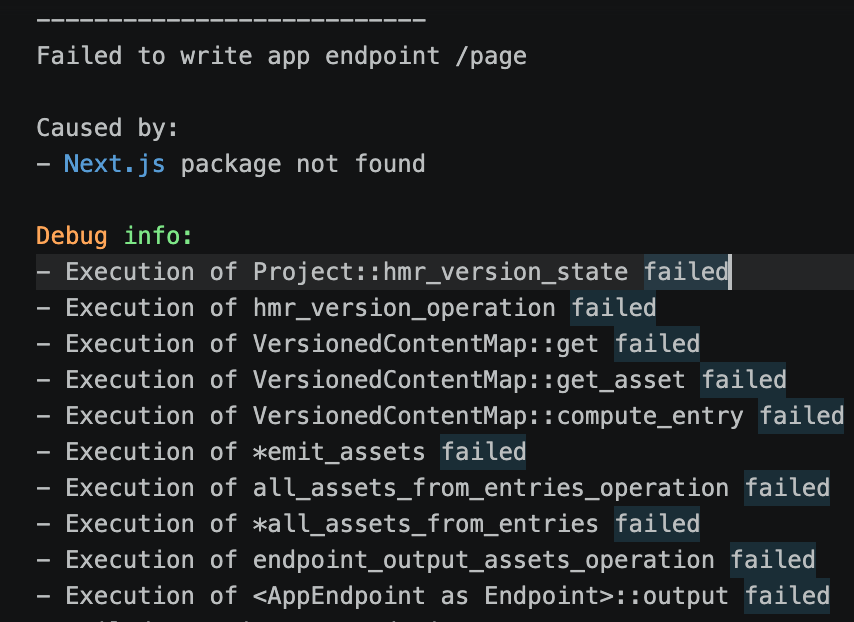
If you dig through that mountain of debug info, you will spot the real culprit:
text

Caused by:
- Next.js package not found
Wait, what? How is the core next package suddenly missing? Here is the deal.
The “Why” (In Plain English)
Turbopack is fast because it is incredibly aggressive about caching your project layout, file mappings, and HMR (Hot Module Replacement) states. To keep things moving at warp speed, Turbopack saves absolute file paths inside its hidden cache directory.
When you move your project to a new directory, those cached paths are suddenly pointing to a ghost town. Turbopack looks for the next package where it used to be, gets confused when it is not there, and throws a massive Rust panic because it cannot localise its own assets.
The 2-Minute Fix
Since the whole issue is just a case of amnesia caused by a stale cache, we just need to clear the slate and force Next.js to relearn where it lives.
1. Stop the server: Exit the broken process by pressing Ctrl + C (or Cmd + C on Mac).
2. Clear the cache and dependencies: We need to delete the .next compiler directory and your local node_modules so the old path references are completely erased.
bash

# Clear away the broken Next.js cache
rm -rf .next

# Wipe your node_modules and lockfiles to clear path conflicts
rm -rf node_modules package-lock.json yarn.lock pnpm-lock.yaml bun.lockb
3. Reinstall dependencies: Reinstall your packages. This forces your package manager to register your brand-new directory paths from scratch. Run whichever install command fits your stack:
bash

npm install   # if you use npm
pnpm install  # if you prefer pnpm
yarn install  # if you use yarn
bun install   # if you use bun
4. Restart the server: Start the development environment again. This generates a fresh .next directory using your correct, current system paths:
bash

npm run dev   # If you use npm
pnpm dev      # If you prefer pnpm
yarn dev      # If you use yarn
bun dev       # If you use bun
Turbopack will spin up, generate a fresh .next directory with your correct, current paths, and you are sorted.
The Alternative Webpack Escape Route
If your node_modules directory is massive and you do not have five minutes to wait for a fresh installation, you can temporarily bypass the issue by turning Turbopack off. Open your package.json file, find your dev script, and drop the --turbo flag:
json

// Change this:
"dev": "next dev --turbo"

// To this:
"dev": "next dev"
This falls back to standard Webpack. It might be a fraction slower on startup, but it does not care about absolute paths and will get your environment running instantly while you wait for a better time to do a full clean installation.